General Information of Website Certificate in Edge 93
Q
How to read general information of a Website certificate in Microsoft Edge 93? What is the meaning of "Issued by"?
✍: FYIcenter.com
A
 This tutorial may help you to understand general information
of the server certificate of a secure Web site.
This tutorial may help you to understand general information
of the server certificate of a secure Web site.
1. Run Microsoft Edge 93 and go to https://www.google.com.
2. Open the Website certificate as shown in the previous tutorial.
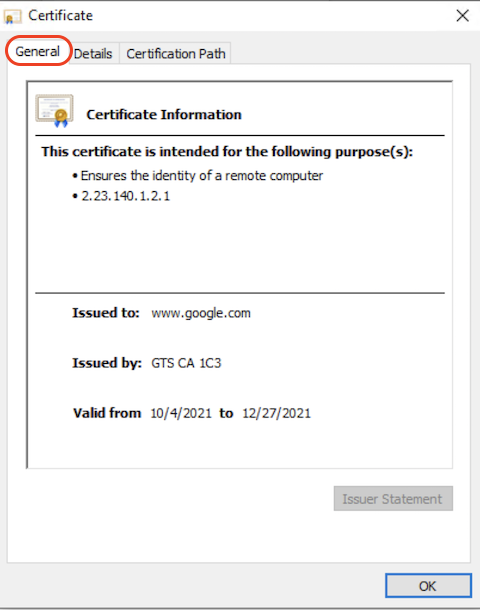
3. Click "General" tab. You see general information of Google server certificate:
- "This certificate is intended for the following purpose(s): Ensures the identity of a remote computer" - This tells that the certificate is valid for identify the Web site only. It can not used for any other purposes like signing another certificate.
- "Issue To: www.google.com" - This tells you that this certificate is intended to identify the "www.google.com" domain name.
- "Issue By: GTS CA 1C3" - This tells you that who issued the certificate.
- "Valid from 10/4/2021 to 12/27/2021" - This tells you that the certificate is valid until 12/27/2021.
The picture below shows you an example of the General information of a server certificate:
⇒ Detailed Information of Website Certificate in Edge 93
⇐ View Website Certificate in Edge 93
2021-11-30, ∼2349🔥, 0💬
Related Topics:

