Website Certificate Status - Lock Icon in Edge
How to check the certificate status of a Website in Microsoft Edge? I want to know if the Website has valid certificate.
✍: FYIcenter.com
 The certificate status of a Website is display as a lock icon next to
the Website address field in Microsoft Edge.
The certificate status of a Website is display as a lock icon next to
the Website address field in Microsoft Edge.
There are 3 possible statuses on a Website certificate:
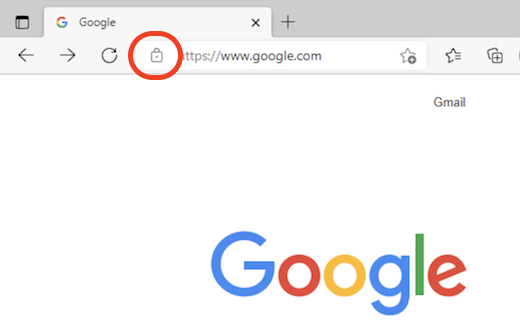
1. Valid Certificate - If a Website has a valid certificate, Microsoft Edge displays a grey lock icon next to the Web address. For example, https://www.google.com.
2. Invalid Certificate - If a Website has an invalid certificate, Microsoft Edge displays a red "Not secure" warning message next to the Web address. For example, https://expired.badssl.com.
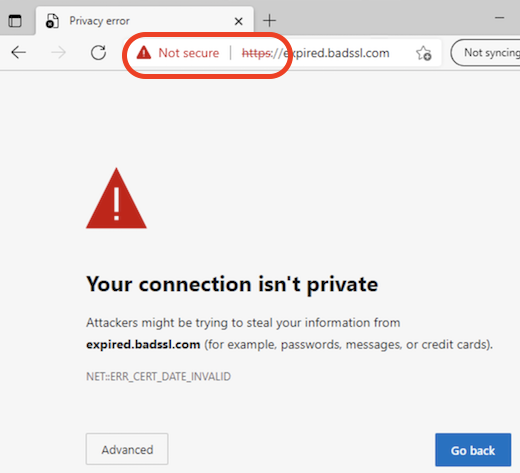
A Website certificate is considered as invalid for various reasons: expired, self-signed, wrong host, etc.
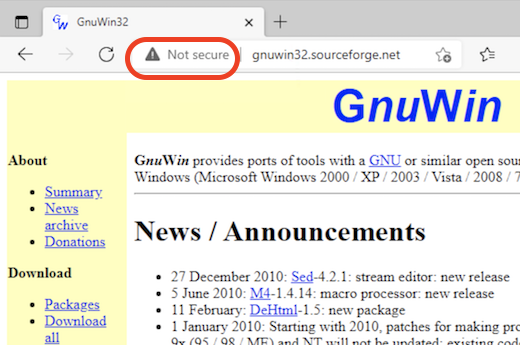
3. No Certificate - A Website may have no certificate at all. Its Web address will start with "http" instead of "https".
In this case, Microsoft Edge displays a grey "Not secure" warning message next to the Web address. For example, http://gnuwin32.sourceforge.net/.
⇒ "Your connection isn't private" in Microsoft Edge
⇐ Using Certificates in Microsoft Edge
2021-11-30, ∼2660🔥, 0💬
Related Topics:

