"makecert.exe -in -eku" - Certificate for Server Authentication
Q
How to create a new certificate to be used by some Web site for server authentication to support HTTPS protocol using "makecert.exe"?
✍: FYIcenter.com
A
 If you want to create a new certificate for some Web site for server authentication,
you can use the "makecert.exe -is -in -eku" options
as shown in this tutorial.
If you want to create a new certificate for some Web site for server authentication,
you can use the "makecert.exe -is -in -eku" options
as shown in this tutorial.
C:\fyicenter>
"\Program Files\Microsoft Visual Studio 8\sdk\v2.0\bin\makecert.exe"
-n "CN=www.yourdomain.com" -is TestStore -in "FYIcenter Root CA"
-ss TestStore -e "07/01/2022" -eku 1.3.6.1.5.5.7.3.1 -pe

Succeeded
What the above command was doing:
- '-n "CN=john@yourdomain.com"' specifies the name of the owner of the new certificate.
- '-is TestStore' specifies the issuer store where the issuer's private key and certificate is located.
- '-in "FYIcenter Root CA"' specifies the issuer name which is the CN of the issuer certificate. This tells the command to sign the new certificate with this issuer's private key, instead of the default "Root Agency".
- '-ss TestStore' specifies the subject store where new certificate will be saved.
- '-e "07/01/2022"' specifies the expiration date of the new certificate.
- '-eku 1.3.6.1.5.5.7.3.1' specifies the new certificate is for "Server Authentication" purpose only.
- '-pe' tells the command to make the new private key exportable.
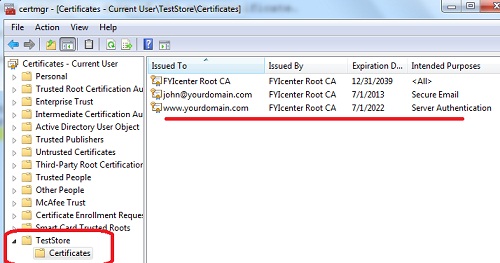
You can verify the result in the certificate store using "certmgr.msc" tool:
⇒ Managing Certificates with Windows PowerShell
⇐ "makecert.exe -in -eku" - Certificate to Secure Email
2012-08-14, ≈21🔥, 0💬
Related Topics:


