Signing Path of Website Certificate in Edge 93
How to see the signing chain of a Website certificate in Microsoft Edge 93? I want to know the root CA who signs the last certificate in the certificate path.
✍: FYIcenter.com
 If you are visiting a Web site that uses a "https" address with Edge 93,
you can view the server certificate path of the site to see who is
the root CA that signs the last certificate in the certificate path
as shown in this tutorial:
If you are visiting a Web site that uses a "https" address with Edge 93,
you can view the server certificate path of the site to see who is
the root CA that signs the last certificate in the certificate path
as shown in this tutorial:
1. Run Microsoft Edge 93 and go to https://www.google.com.
2. Open the Website certificate as shown in the previous tutorial.
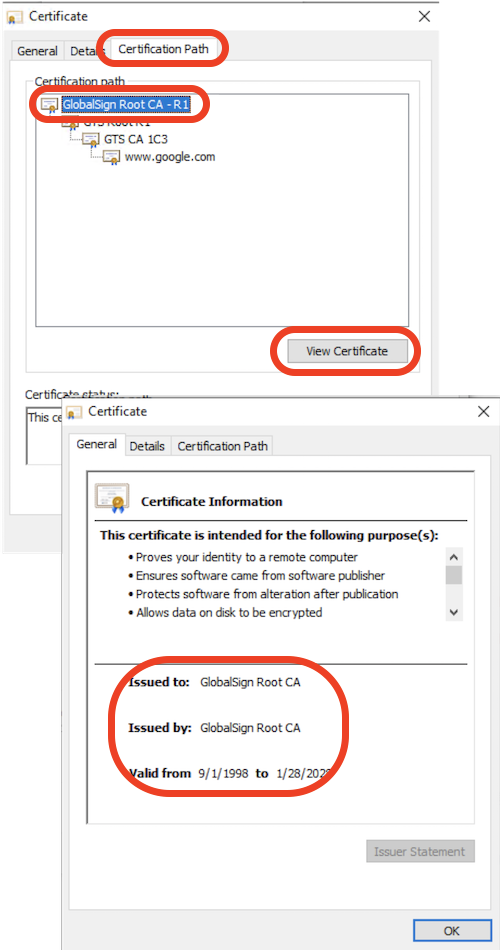
3. Click "Certificate Path" tab. You see the certificate path (signing chain) showing up.
4. Click the top name in the Certificate Hierarchy list: "GlobalSign Root CA - R1".
5. Click "View Certificate" button to see more information about the root CA (Certificate Authority).
⇒ Export Website Certificate from Edge 93 to File
⇐ Detailed Information of Website Certificate in Edge 93
2021-11-30, ∼2134🔥, 0💬
Related Topics:


