"makecert.exe -r" - Create Self-Signed Root Certificate
How to create a self-signed root certificate using "makecert.exe"? I want to issue and sign certificate for others.
✍: FYIcenter.com
 If you want to create a self-signed root certificate, you can use the "makecert.exe -r" option
as shown in this tutorial.
If you want to create a self-signed root certificate, you can use the "makecert.exe -r" option
as shown in this tutorial.
C:\fyicenter>
"\Program Files\Microsoft Visual Studio 8\sdk\v2.0\bin\makecert.exe"
-n "CN=FYIcenter Root CA" -r -ss TestStore

Succeeded
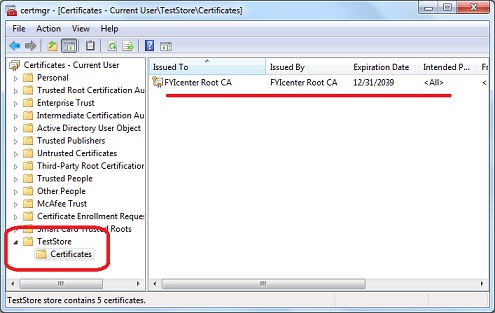
The above command with the "-r" option generated a self-signed certificate that can be used as a root CA certificate to sign other certificates. The private key and certificate are all stored in the system certificate store called "TestStore".
You can verify the result in the certificate store using "certmgr.msc" tool:
⇒ "makecert.exe -in -eku" - Certificate to Secure Email
⇐ "makecert.exe -sv" - Create Private Key File
2012-08-13, ≈14🔥, 0💬
Related Topics:


