"makecert.exe -ss" - Create New System Certificate Store
Q
How to create a new system certificate store using the "makecert.exe" command?
✍: FYIcenter.com
A
 Yes, "makecert.exe" command is powerful. You can create a new system certificate store
if you specify the "-ss store" option with a new store name
as shown in this tutorial.
Yes, "makecert.exe" command is powerful. You can create a new system certificate store
if you specify the "-ss store" option with a new store name
as shown in this tutorial.
1. Run the following command to create a new certificate and save it into a new system store called "TestStore":
C:\fyicenter>
"\Program Files\Microsoft Visual Studio 8\sdk\v2.0\bin\makecert.exe"
-n "CN=Lucy Dews" -ss TestStore

Succeeded
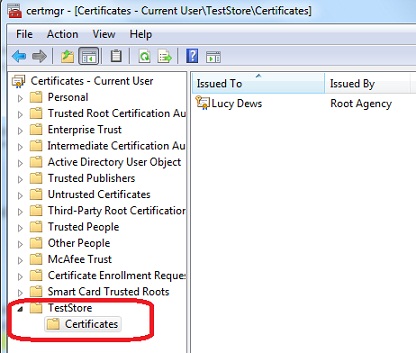
2. Run the "certmgr.msc" tool to see the new store, "TestStore":
⇒ "makecert.exe -pe" - Export Private Key from Certificate Store
⇐ "makecert.exe -ss" - Create Certificate in System Stores
2021-05-15, ≈23🔥, 8💬
Related Topics:

