"makecert.exe -n" - Create Test Certificate File
Q
How to create a test certificate for myself using the "makecert.exe" command?
✍: FYIcenter.com
A
 You can create a test certificate for yourself using "certmgr.exe -n" command
as shown in this tutorial.
You can create a test certificate for yourself using "certmgr.exe -n" command
as shown in this tutorial.
1. Run the following command in a command line window to create a certificate with your name "Fred Dews":
C:\fyicenter>
"\Program Files\Microsoft Visual Studio 8\sdk\v2.0\bin\makecert.exe"
-n "CN=Fred Dews" fred.crt

Succeeded
2. Double-click on the output certificate file, "fred.crt". You see general information of your certificate.
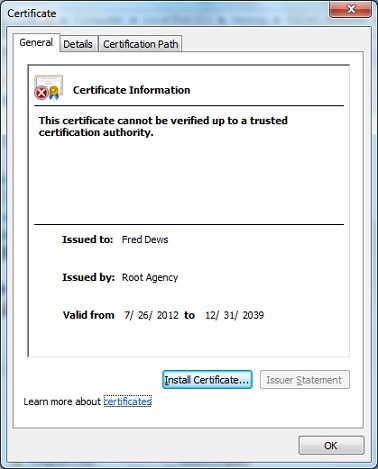
Note that the previous "makecert.exe" command actually:
- Generated a pair of private key and public key first with the default algorithm.
- Signed the public key by the system default root CA: "Root Agency" into a certificate for "Fred Dews".
- Stored the certificate in a certificate file "fred.crt".
- The private was not attached to the certificate. It was stored somewhere else by the system.
⇒ makecert.exe - Private Key Containers Location on Windows
⇐ makecert.exe - List of Command Basic Options
2021-04-16, ≈12🔥, 1💬
Related Topics:

