View Website Certificate in Edge 93
Q
How to view the certificate of a Website in Microsoft Edge 93?
✍: FYIcenter.com
A
 If a Website has a valid certificate,
you can follow this tutorial to view the certificate
in Microsoft Edge 93.
If a Website has a valid certificate,
you can follow this tutorial to view the certificate
in Microsoft Edge 93.
1. Run Microsoft Edge 93 and go to https://www.google.com.
2. Click the lock icon next to the Web address field. You see the "About ..." dialog box.
3. Click "Connection is secure" You see the security summary:
This site has a valid certificate issued by a trusted authority.

This means information (such as passwords or credit cards) will be
securely sent to this site and cannot be intercepted.

...
4. Click the certificate icon near the top right corner of the dialog box. You see the certificate opened with general information.
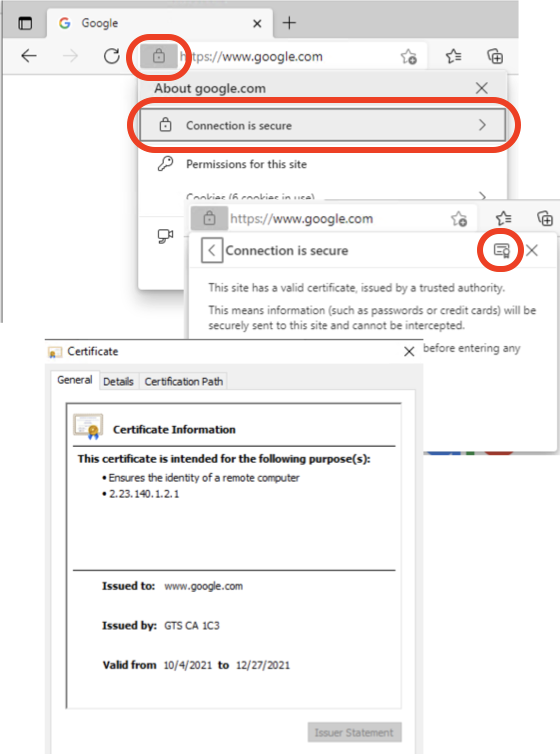
⇒ General Information of Website Certificate in Edge 93
⇐ Viewing Website Certificate in Microsoft Edge 93
2021-11-30, ∼3795🔥, 0💬
Related Topics:

