General Information of Server Certificate in IE
Q
How to read general information of a server certificate in IE? What is the meaning of "Issued by"?
✍: FYIcenter.com
A
 This tutorial may help you to understand general information
of the server certificate of a secure Web site.
This tutorial may help you to understand general information
of the server certificate of a secure Web site.
1. Run IE and visit www.bestbuy.com Web site. And click "My Account" on top of the page.
2. Open the server certificate as shown in the previous tutorial.
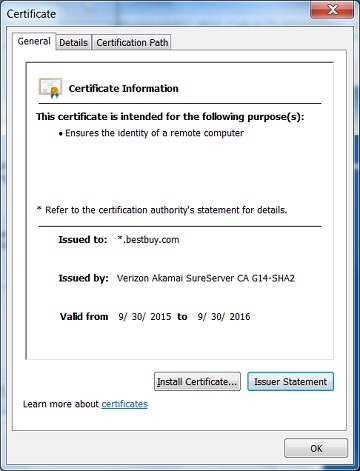
3. Click "General" tab. You see general information of Bust Buy server certificate like:
- "This certificate is intended for the following purpose(s): Ensures the identity of a remote computer" - This tells that the certificate is valid for identify the Web site only. It can not used for any other purposes like signing another certificate.
- "Issue To: *.bestbuy.com" - This tells you that Best Buy plan to use this single certificate to identify all servers under the "bestbuy.com" domain name.
- "Issue By: Verizon Akamai SureServer CA G14-SHA2" - This tells you that who issued the certificate.
- "Valid from 9/30/2016 to 9/30/2016" - This tells you that the certificate is valid until 9/30/2016.
The picture below shows you an example of the General information of a server certificate:
⇒ Detailed Information of Server Certificate in IE
⇐ View Web Site Server Certificate in IE
2012-07-31, ∼7722🔥, 0💬
Related Topics:

