Open and View CRL File
How to open and view a CRL (Certificate Revocation List) file? I just downloaded a CRL from the certificate's CA Website.
✍: FYIcenter.com
 If you want to open and view the list of revoked certificates in
CRL (Certificate Revocation List) file
you can follow this tutorial.
If you want to open and view the list of revoked certificates in
CRL (Certificate Revocation List) file
you can follow this tutorial.
1. Open the certificate by double-click the CRL file name (for example GTSGIAG3.crl) on a Windows computer. You see the "Certificate Revocation List" window displayed.
2. Click "General" tab. You see general information of the CA who signed this CRL file.
Issuer: Google Internet Authority G3
3. Click "Revocation List" tab. You see a list of revoked certificates.
4. Click first serial number is in revokation list. You see details about this revocation:
Serial number:     15a779108904edb2
Revokcation date:  Friday, March 8, 2019
CRL Reason Code:   Superseded(4)
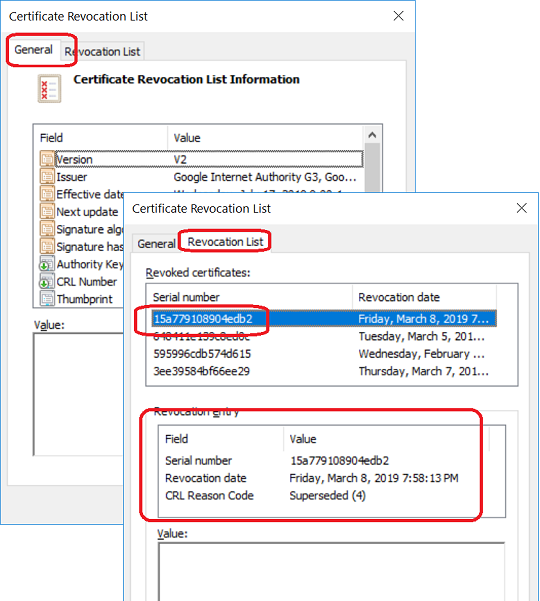
5. Go back and review the original X.509 certificate. If it has a serial number of "15a779108904edb2" and issued by "Google Internet Authority G3", then that certificate is revoked.
Â
⇒ CRL File Format and Fields
⇠Retrieve CRL File from Certificate CA
2019-07-19, ≈14🔥, 0💬
Related Topics:

💬 2020-05-27 John Bidden: That is goooooooood
💬 2020-05-27 Huhu Joson: I think it is a wonderful website...
