Import Root CA Certificate into IE
How to import a root CA certificate into IE? I have the certificate in a file.
✍: FYIcenter.com
 If you want to import a CA certificate into IE from a file,
you can follow this tutorial.
If you want to import a CA certificate into IE from a file,
you can follow this tutorial.
1. Start "Certificate Manager" in IE.
2. Click "Trusted Root Certificate Authorities" tab.
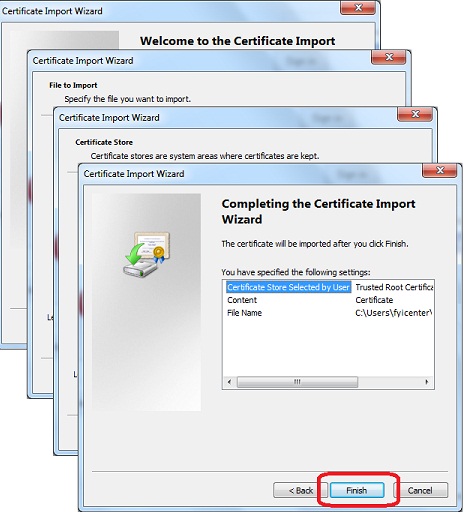
3. Click "Import" button. You see "Certificate Import Wizard" showing up.
4. Click "Next" button. You see "File to Import" screen showing up.
5. Use "Browse..." button to find the CA certificate file and click "Next" button. You see "Certificate Store" screen showing up.
6. Make sure "Trusted Root Certificate Authorities" is selected as the certificate store and click "Next" button. You see confirmation screen showing up.
7. Use "Finish" button to finish importing the certificate into IE
⇒ Context Menu for Page Properties in IE
⇐ Warning Message on Deleting Certificate in IE
2012-07-30, ≈10🔥, 0💬
Related Topics:
