Retrieve CRL File from Certificate CA
How to retrieve the CRL from the certificate's CA? I want to verify if the certificate has been revoked or not.
✍: FYIcenter.com
 If you want to retrieve the CRL from the certificate's CA to
validate the revocation status of a certificate,
you can follow this tutorial.
If you want to retrieve the CRL from the certificate's CA to
validate the revocation status of a certificate,
you can follow this tutorial.
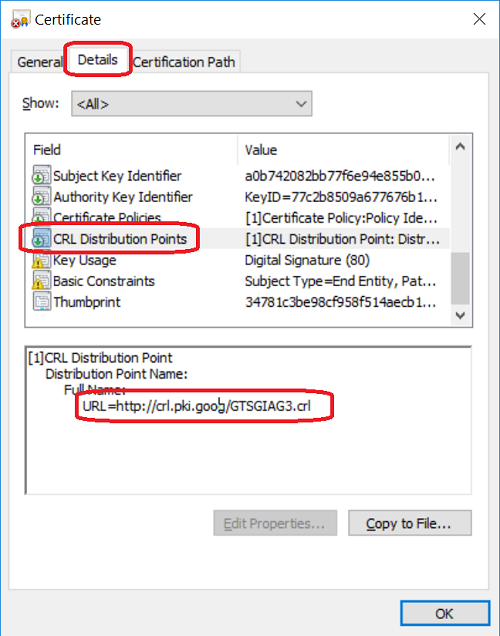
1. Open the certificate by double-click the certificate file name on a Windows computer. You see the "Certificate" window displayed.
2. Click "Details" tab. You see a list of certificate attributes.
3. Scroll down and click "CRL Distribute Points". You see a CRL's URL like, http://crl.pki.goog/GTSGIAG3.crl.
4. Copy and paste this URL to a Web browser. You see the CRL file, GTSGIAG3.crl, downloaded.
See the next tutorial on how to open a CRL file.
Â
⇠What Is CRL (Certificate Revocation List)
2019-07-19, ∼6070🔥, 0💬
Related Topics:

💬 2020-05-27 John Bidden: That is goooooooood
💬 2020-05-27 Huhu Joson: I think it is a wonderful website...
