Details of Secure Connection with Chrome on Android
How to get more detailed information on the connection to a secure Web site with Chrome on my Android device?
✍: FYIcenter.com
 If you are visiting a Web site that uses "https" with Chrome
and the site has valid certificate, your connection is private and secured.
More detail detailed information of the secure connection can be obtained
as shown in this tutorial.
If you are visiting a Web site that uses "https" with Chrome
and the site has valid certificate, your connection is private and secured.
More detail detailed information of the secure connection can be obtained
as shown in this tutorial.
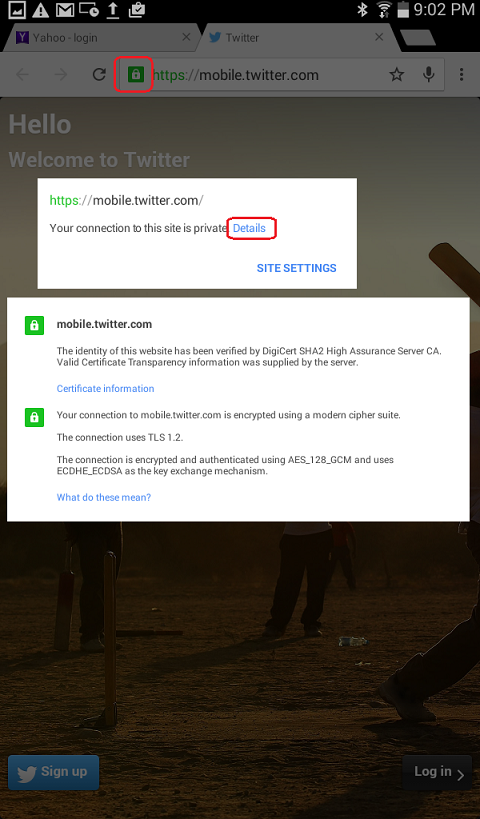
1. Open Chrome and visit mobile.twitter.com. Chrome will display a green lock icon in the Web address area, indicating the certificate of the Web site is valid.
2. Tap on the greed lock icon. A pop up message shows up saying: "Your connection to this site is private."
3. Tap on the "Details" link. Another pop up message shows up to give you more details:
mobile.twitter.com

The identification of this website has been verified by
DigiCert SHA2 High Assurance Server CA. Valid Certificate
Transparency information was supplied by the server.

Your connection to mobile.twitter.com is encrypted using
a modern cipher suite.

The connection uses TLS 1.2.

The connection is encrypted and authenticated using
AES_128_GCM and uses ECDHE_ECDSA as the key exchange mechanism.
4. You trust the connection and continue to use this website.
Â
⇒ Chrome "Your connection is not private" Error on Android
⇠Certificates and Google Chrome on Android
2016-02-10, ∼5337🔥, 0💬


