Export Private Key from Mac
How to export a private key from Mac computer to a file?
✍: FYIcenter.com
 If you have a private key stored in Keychain Access on your Mac computer,
you can export it to a key file
as shown in this tutorial.
If you have a private key stored in Keychain Access on your Mac computer,
you can export it to a key file
as shown in this tutorial.
1. Open "Launchpad > Other > Keychain Access" on your Mac computer. You see "Keychain Access" window.
2. Select "Certificates" in the "Category" list under "login" Keychain.
3. Find the private key that needs to be exported. Private keys are hidden under certificates that are marked with arrow icons.
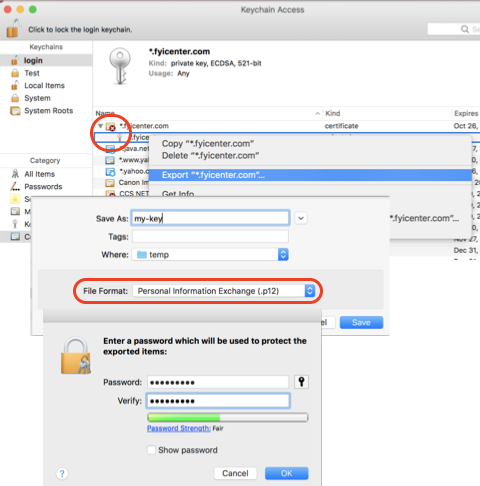
4. Right-click on the private key name. And select "Export ...". You see the save file window.
5. Enter file like "my-key". And select "Personal Information Exchange (.p12)" in the "File Format" field.
6. Click "Save". You see the new password window.
7. Enter a new password to encrypt the private key. And click "OK". You see the keychain password prompt.
8. Enter the password of the "login" keychain. And click "Allow". The selected private is exported.
Now you can import the private key (my-key.p12) to other certificate tools.
⇒ What Is Keychain Password on Mac
2022-05-15, ∼2488🔥, 0💬
Related Topics:

