Import Root CA Certificate into Mac
How to import a root CA certificate into Mac computer? I have the certificate in a file.
✍: FYIcenter.com
 If you want to import a CA certificate into Keychain Access from a file,
you can follow this tutorial.
If you want to import a CA certificate into Keychain Access from a file,
you can follow this tutorial.
1. Open "Launchpad > Other > Keychain Access" on your Mac computer. You see "Keychain Access" window.
2. Click "File > New Keychain..." to add a new keychain called "test".
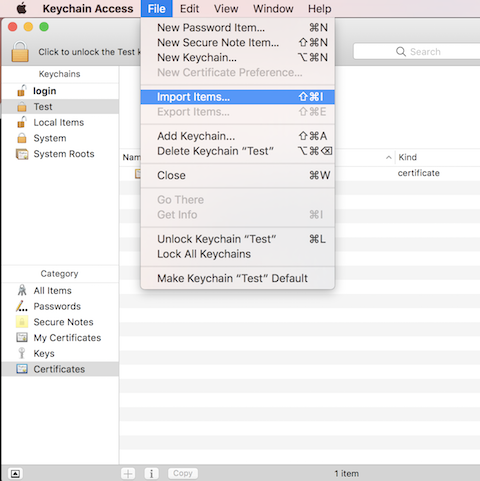
3. Select "Certificates" in the "Category" list associated the new keychain "Test". You see an empty list of certificates.
4. Click "File > Import Items..." to browse import a certificate from a file like "GeoTrust Global CA.cer". You see the root CA certificate imported.
You can import a root CA certificate into the "System Roots" keychain in the same way.
⇒ Validate/Evaluate Certificate on Mac
⇐ "Never Trust" Root CA Certificate on Mac
2022-05-01, ∼1828🔥, 0💬
Related Topics:

