Export Server Certificate Path in Google Chrome 51
How to export all certificates in the server certificate path to a file in Google Chrome 51?
✍: FYIcenter.com
 To export all certificates in the server certificate path to a file in Google Chrome 51,
you can choose the "PKCS #7" file format
as shown in this tutorial:
To export all certificates in the server certificate path to a file in Google Chrome 51,
you can choose the "PKCS #7" file format
as shown in this tutorial:
1. Visit https://www.paypal.com Web site with Google Chrome 51.
2. Open the server certificate as shown in the previous tutorial.
3. Click "Details" tab. You see the server certificate listed at the bottom of the Certificate Hierarchy list.
4. Click "Copy to File..." button. You see "Certificate Export Wizard" showing up.
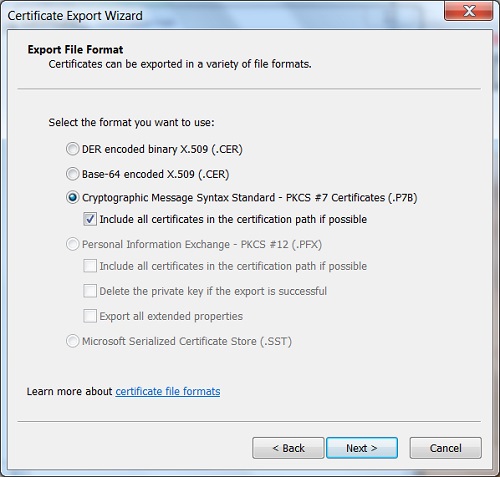
5. Click "Next" on the wizard. You see the "Export File Format" selection screen.
6. Select "Cryptographic Message Syntax Standard - PKCS #7 Certificates (.P7B)", and check "Include all certificates in the certification path if possible".
7. Click "Next" to finish saving all certificates into a single file, "C:\fyicenter\paypal.p7b".
See the picture below:
⇒ "connection is not private" Error in Google Chrome 51
⇐ Export Server Certificate in Google Chrome 51 to File
2013-12-02, ∼9602🔥, 0💬
Related Topics:

💬 2023-01-05 facebook: 6CD4E5193BC30C1AB6869EDBBBFE17A873E1 B3BC
💬 2017-07-29 FYIcenter.com: @Walter, Tutorial updated now. Thanks for your comment!
