Delete Root CA Certificate from Google Chrome 51
How to delete a root CA certificate from Google Chrome 51? I don't know this CA (Certificate Authority) and don't want to trust any Web sites that uses this CA.
✍: FYIcenter.com
 On a Windows 7 system, you can not delete a server certificate from Google Chrome 51
if you don't have the admin permission.
The "Remove" button is grayed out on Certificate Manager.
On a Windows 7 system, you can not delete a server certificate from Google Chrome 51
if you don't have the admin permission.
The "Remove" button is grayed out on Certificate Manager.
Follow steps below to delete a root CA certificate from Google Chrome 51 to a file:
1. Close all Google Chrome 51 windows.
2. Type "Google Chrome 51" in the Start search box You see list of suggestions.
3. Right-mouse click on "Google Chrome 51" in the suggestion list. You see the context menu.
4. Click "Run as administrator" on the context menu. You see Google Chrome 51 started.
5. Start "Certificate Manager" in Google Chrome 51.
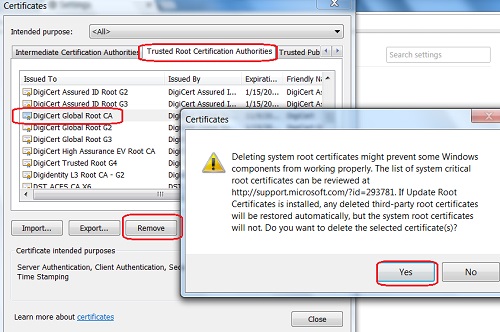
6. Click "Trusted Root Certification Authorities" tab. You see the list of trusted CA certificates showing up.
7. Scroll down in the list and click on "DigiCert Global Root CA".
8. Click "Remove" button. You see a warning message.
9. Click "Yes" button to finish deleting the certificate.
The following picture shows you how to delete a root CA certificate from Chrome:
⇒ Import Root CA Certificate into Google Chrome 51
⇐ Export CA Certificate from Google Chrome 51 to File
2022-11-19, ≈27🔥, 3💬
Related Topics:
