Export CA Certificate from Google Chrome 51 to File
How to export a CA certificate from Google Chrome 51? I want to save a copy before removing the CA certificate.
✍: FYIcenter.com
 If you want export a copy of a CA certificate from Google Chrome 51,
you can follow this tutorial:
If you want export a copy of a CA certificate from Google Chrome 51,
you can follow this tutorial:
1. Start "Certificate Manager" in Google Chrome 51.
2. Click "Trusted Root Certification Authorities" tab. You see the list of trusted CA certificates showing up.
3. Scroll down in the list and double-click on "DigiCert Global Root CA". You see the Certificate Viewer showing up.
4. Click "Details" tab. You see details of the certificate showing up. Verify this is the certificate you want to export.
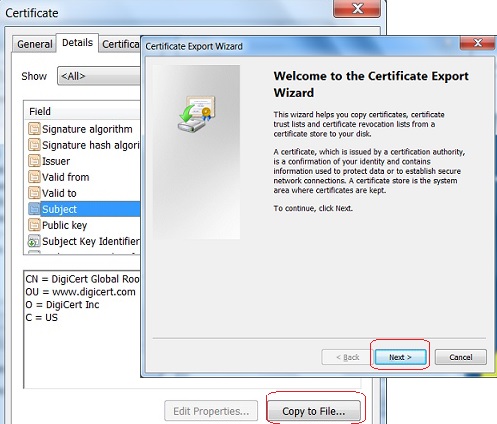
5. Click "Copy to File..." button. You see "Certificate Export Wizard" screen showing up.
6. Follow instruction on the wizard and save the certificate to a file, "C:\fyicenter\DigiCert.cer".
The following picture shows you how to export a root CA certificate from Chrome:
⇒ Delete Root CA Certificate from Google Chrome 51
⇐ Details View of Root CA Certificate in Google Chrome 51
2013-11-21, ≈19🔥, 0💬
Related Topics:
