certmgr.msc - Search Certificate in Certificate Stores
How to search for certificates in all certificate stores using "certmgr.msc"? I want to see all certificates issued by Microsoft.
✍: FYIcenter.com
 You can search for certificates in certificate stores
using the "certmgr.msc" tool as shown in this tutorial.
You can search for certificates in certificate stores
using the "certmgr.msc" tool as shown in this tutorial.
1. Start "certmgr.msc" Management Console on your Windows system.
2. Click "Certificates - Current User" to perform search on all certificate stores.
3. Click "Action > Find Certificates..." menu. You see Find Certificates screen showing up.
4. Enter "Microsoft" in the Contains field, keep "Issued By" as the Look in Field, and click "Find Now" button. You see search result showing up.
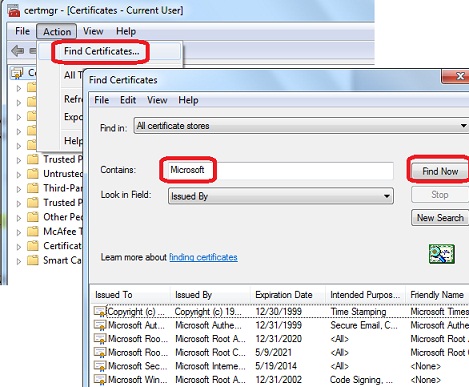
There are many certificates that are issued by Microsoft. Some of them are already expired long time ago. We have no idea why Microsoft is still keep them on the system!
⇒ certmgr.msc - Import Root CA Certificate
⇐ certmgr.msc - Delete Certificate from Certificate Store
2012-08-03, ≈21🔥, 0💬
Related Topics:
