certmgr.msc - Export Certificate List on Windows
How to get the list of certificates from a certificate store in a text file? I want to keep a copy of it.
✍: FYIcenter.com
 You can export a list of certificates in a certificate store using the
"certmgr.msc" tool as shown in this tutorial.
You can export a list of certificates in a certificate store using the
"certmgr.msc" tool as shown in this tutorial.
1. Start "certmgr.msc" Management Console on your Windows system. You see list of certificate stores showing up.
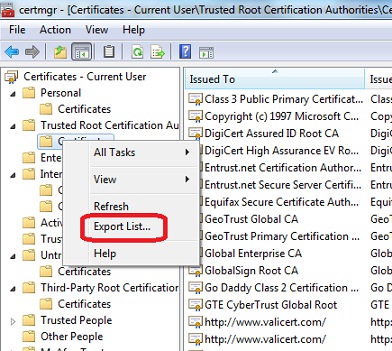
2. Click to open "Trusted Root Certificate Authorities" You see Certificates container showing up.
3. Right-mouse click on "Certificates" You see context menu showing up
4. Click "Export List..." in the context menu. You see save file screen showing up.
5. Enter a text file name like "C:\fyicenter\Root_CA_List.txt" and click "Save".
See the picture below:
⇒ certmgr.msc - View Certificate General Info
⇐ certmgr.msc - Types of Certificate Stores on Windows
2012-08-02, ≈17🔥, 0💬
Related Topics:

