certmgr.msc - Import Personal Certificate
How to import personal certificate into certificate stores using "certmgr.msc"? My personal certificate also contains my private key and is stored in a PKCS#12 (Public-Key Cryptography Standards #12) file.
✍: FYIcenter.com
 You can import a private key with a self-signed certificate stored
in a PKCS#12 file into certificate stores
using the "certmgr.msc" tool as shown in this tutorial.
You can import a private key with a self-signed certificate stored
in a PKCS#12 file into certificate stores
using the "certmgr.msc" tool as shown in this tutorial.
1. Start "certmgr.msc" Management Console on your Windows system. And click "Personal".
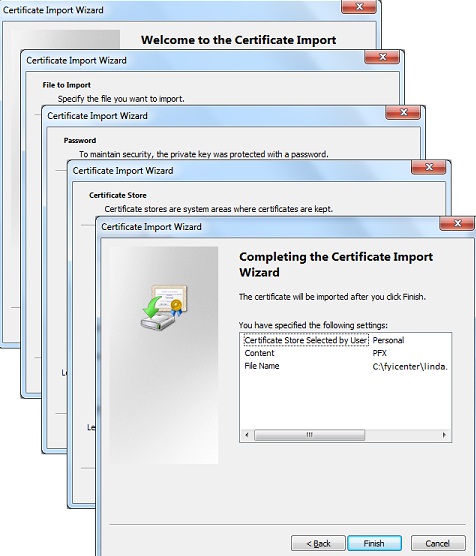
2. Click "Action > All Tasks > Import..." menu You see "Certificate Import Wizard" showing up.
3. Click "Next" button. You see "File to Import" screen showing up.
4. Use "Browse..." button to find the CA certificate file like "C:\fyicenter\linda.p12" and click "Next" button. You see Password screen showing up. PKCS#12 files contain private keys and are password protected.
5. Enter "FYIcenter" as the password and click "Next" button. You see "Certificate Store" screen showing up.
6. Keep the suggested Personal certificate store and click "Next" button. You see confirmation screen showing up.
7. Click "Finish" button to finish importing the private key and its self-signed certificate.
⇒ certmgr.msc - View Personal Certificate
⇐ certmgr.msc - Import Root CA Certificate
2012-08-03, ≈23🔥, 0💬
Related Topics:

