Certificate Stores in Mozilla Firefox 125
What are certificate stores userd by the Certificate Manager in Mozilla Firefox 125?
✍: FYIcenter.com
 In Mozilla Firefox 125, local certificates are classified into
5 categories and each category uses a separate certificate store
as listed below:
In Mozilla Firefox 125, local certificates are classified into
5 categories and each category uses a separate certificate store
as listed below:
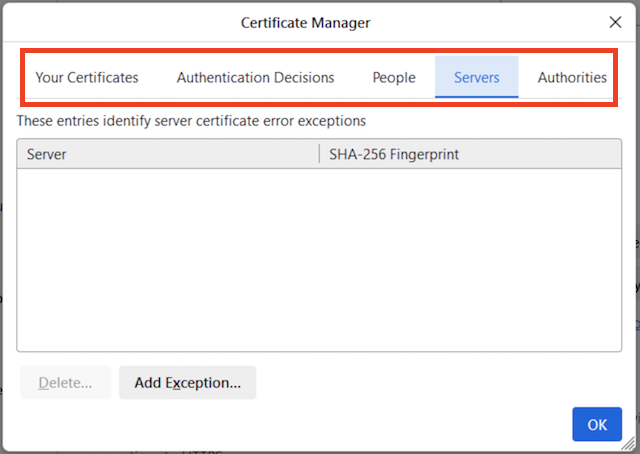
- Your Certificates - Your personal certificates with private keys that certify your identities like your name, login ids, or email addresses. They are used to sign documents/emails, or decrypt messages encrypted by your public keys.
- Authentication Decisions - Your local host client certificates with private keys that certify your host identities like IP addresses or host names. They are used to perform client certificate authentications required by remote servers.
- People - Personal certificates that certify other people's identities like their name, login ids, or email addresses. They are used to verify documents/email signatures, or encrypt outgoing messages.
- Servers - Server certificates that certify remote host identities like IP addresses or host names. They are used to override server certificate validation exceptions.
- Authorities - Root CA certificates that identify trusted authorities. They are used to validate certificates of other people or remote hosts.
Here is how to see the list of certificate stores in the Certificate Manager.
1. Run Mozilla Firefox 125.
2. Click the menu icon. You see a pop up menu.
3. Click the "Settings" entry in the pop up menu. You see a Settings page displayed.
4. Click the "Privacy & Security" link in the left menu. You see privacy and security settings displayed.
5. Scroll down and click "View Certificates" button in the Certificates section. You see the Certificate Manager displayed with certificate stores listed as tabs.
7. Click on each tab to see a list of certificates in each store.
⇒ List of Root CA Certificates in Mozilla Firefox 125
⇐ Start "Certificate Manager" in Mozilla Firefox 125
2026-01-24, ≈10🔥, 0💬
Related Topics:
