security.enterprise_roots.enabled Configuration in Mozilla Firefox
What is the security.enterprise_roots.enabled configuration in Mozilla Firefox?
✍: FYIcenter.com
 security.enterprise_roots.enabled configuration in Mozilla Firefox
allows you to trust additional root CA certificates from
the operating system.
security.enterprise_roots.enabled configuration in Mozilla Firefox
allows you to trust additional root CA certificates from
the operating system.
If you want root CA certificates trusted by the operating system to be shared by Mozilla Firefox automatically, you can turn the security.enterprise_roots.enabled configuration.
1. Open Mozilla Firefox and enter "about:config" in the address box. You see warning message displayed.
Proceed with Caution

Changing advanced configuration preferences can impact Firefox
performance or security.

[x] Warn me when I attempt to access these preferences.

[Accept the Risk and Continue]

2. Click "Accept the Risk and Continue" button. You see the configuration search page showing up.
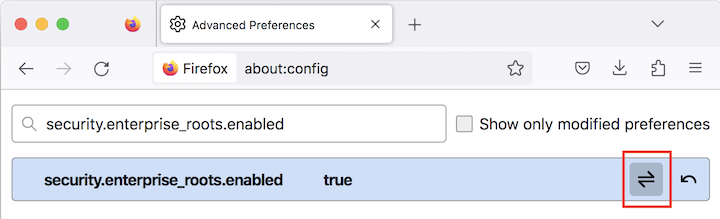
3. Enter "security.enterprise_roots.enabled" in the search box. You see the current value of the configuration.
4. Click toggle icon to change the value to "true".
⇒ "Potential Security Risk Ahead" Warning in Firefox
⇐ Firefox Certificate Store File Location
2024-07-25, ≈11🔥, 1💬
Related Topics:

