Add Certificate Validation Exception in Mozilla Firefox 9
Can I continue to use the Web site, even if it has the "This Connection is Untrusted" error?
✍: FYIcenter.com
 Normally, you should not continue to use the Web site, if
it has the "This Connection is Untrusted" error.
But if you don't plan to exchange any sensitive data with the site,
you can continue to use it as shown in this tutorial.
Normally, you should not continue to use the Web site, if
it has the "This Connection is Untrusted" error.
But if you don't plan to exchange any sensitive data with the site,
you can continue to use it as shown in this tutorial.
1. Delete root CA certificate "VeriSign Class 3 Public Primary Certification Authority - G5" as shown in the previous example.
2. Visit Web site "https://www.paypal.com". You see the "This Connection is Untrusted" error screen showing up.
3. Click "I Understand the Risks". You see an extra warning message showing up: "If you understand what's going on, you can tell Mozilla Firefox to start trusting this site's identification. Even if you trust the site, this error could mean that someone is tampering with your connection. Don't add an exception unless you know there's a good reason why this site doesn't use trusted identification."
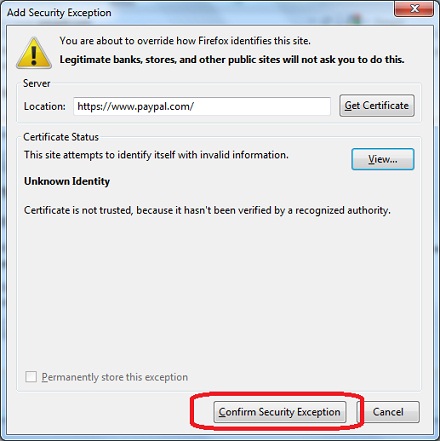
4. Click "Add Exception" button. You see "Add Security Exception" screen showing up.
5. Click "Confirm Security Exception" to continue visiting the Web site.
You can import the root CA certificate back to Mozilla Firefox to stop this error.
⇒ Security Component Error on Starting Mozilla Firefox 9
⇐ "This Connection is Untrusted" Error in Mozilla Firefox 9
2016-08-30, ∼4536🔥, 0💬
Related Topics:

💬 2020-05-27 John Bidden: That is goooooooood
💬 2020-05-27 Huhu Joson: I think it is a wonderful website...

💬 2016-11-06 michael: i need whatsapp but my phone it cant run internet
💬 2016-11-06 michael: my phone is giving problem of apps that are not working how to fix them