"Your connection is not secure" Error in Mozilla Firefox 47
Why I am getting the "Your connection is not secure" error screen in Mozilla Firefox 47?
✍: FYIcenter.com
 You will see the "Your connection is not secure" error screen in Mozilla Firefox 47,
if Mozilla Firefox 47 failed to validate the server certificate provided by the Web site you are visiting.
One of the reason for the validation failure is missing the root CA certificate in Mozilla Firefox 47
as shown in this tutorial:
You will see the "Your connection is not secure" error screen in Mozilla Firefox 47,
if Mozilla Firefox 47 failed to validate the server certificate provided by the Web site you are visiting.
One of the reason for the validation failure is missing the root CA certificate in Mozilla Firefox 47
as shown in this tutorial:
1. Run Mozilla Firefox 47 and go to "Tools > Options" menu.
2. Click "Advanced > Certificates" tab and "View Certificates" button.
3. Click "Authorities" tab and select "VeriSign Class 3 Public Primary Certification Authority - G5".
4. Click "Export..." button to save a copy of this CA certificate to a file called "VeriSignCA.crt".
5. Click "Delete or Distrust..." button to delete it from Mozilla Firefox 47.
6. Close Mozilla Firefox 47 and start it again.
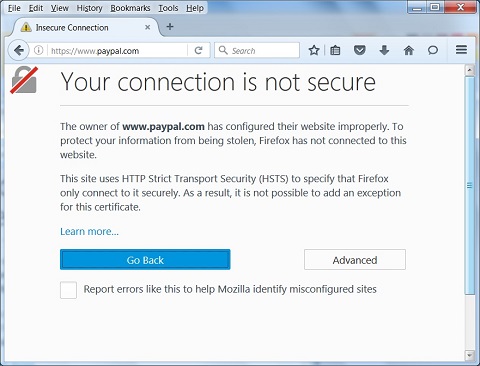
6. Visit Web site "https://www.paypal.com". You see the "Your connection is not secure" error screen showing up. It says:
The owner of www.paypal.com has configured their website improperly.
To protect your information from being stolen, Mozilla Firefox 47 has not
connected to this website.

This site uses HTTP Strict Transport Security (HSTS) to specify that
Firefox only connect to it securely. As a result, it is not possible
to add an exception for this certificate.
The picture below shows you the "Your connection is not secure" error page:
You know why. Because you deleted the root CA certificate from Mozilla Firefox 47. Don't worry, you can import it back to Mozilla Firefox 47 by following the other tutorial.
⇒ Add Certificate Exception in Mozilla Firefox 47
⇐ Export Server Certificate Full Path in Mozilla Firefox 47 to File
2012-07-26, ≈19🔥, 0💬
Related Topics:

