Export Server Certificate Full Path in Mozilla Firefox 47 to File
How to export all certificates in the server certificate path to a file in Mozilla Firefox 47?
✍: FYIcenter.com
 To export all certificates in the server certificate path to a file in Mozilla Firefox 47,
you can choose the "X.509 Certificate with chain (PEM)" file type
as shown in this tutorial:
To export all certificates in the server certificate path to a file in Mozilla Firefox 47,
you can choose the "X.509 Certificate with chain (PEM)" file type
as shown in this tutorial:
1. Visit https://www.paypal.com Web site with Mozilla Firefox 47.
2. Open the server certificate as shown in the previous tutorial.
3. Click "Details" tab. You see the server certificate listed at the bottom of the Certificate Hierarchy list.
4. Click the server certificate like "www.paypal.com"
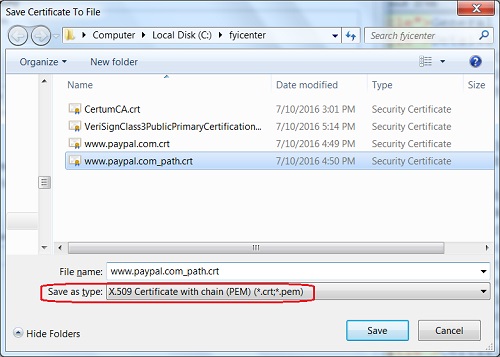
5. Click "Export..." button. You see "Save Certificate To File" screen showing up.
6. Select "X.509 Certificate with chain (PEM)" file type and click "Save" button to save all certificates in the certificate path. The default file name is something like: "www.paypal.com.crt".
⇒ "Your connection is not secure" Error in Mozilla Firefox 47
⇐ Export Server Certificate in Mozilla Firefox 47 to File
2012-07-26, ∼8349🔥, 0💬
Related Topics:

