Java Control Panel - System Signer CA Certificates
Q
How to view Java system-level signer CA certificates using Java Control Panel?
✍: FYIcenter.com
A
 To view Java system-level signer CA certificates with Java Control Panel,
follow these steps:
To view Java system-level signer CA certificates with Java Control Panel,
follow these steps:
1. Start "Java Control Panel" in "Windows Control Panel" under the "Programs" category.
2. Click "Security" tab, then "Certificates..." button.
3. Change "Certificate Type" to "Singer CA", and click "System" tab. List of system-level signer CA certificates shows up:
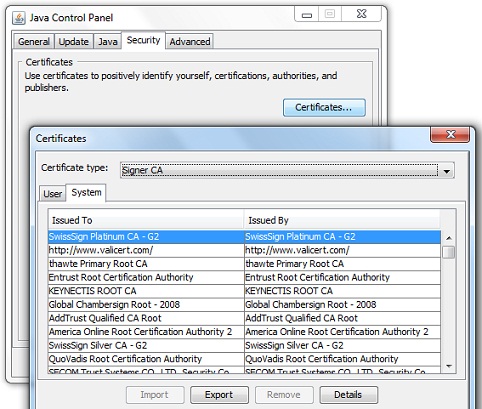
Note that if you are not system admin, you are not allowed to import system-level signer CA certificate.
⇒ Java Control Panel - Certificate Details
⇐ Java Control Panel - User Certificates
2012-07-21, ≈16🔥, 0💬
Related Topics:
