Java Control Panel - User Certificates
Q
How to view Java user-level trusted certificates using Java Control Panel?
✍: FYIcenter.com
A
 To view Java user-level trusted certificates with Java Control Panel,
follow these steps:
To view Java user-level trusted certificates with Java Control Panel,
follow these steps:
1. Start "Java Control Panel" in "Windows Control Panel" under the "Programs" category.
2. Click "Security" tab, then "Certificates..." button. List of user-level trusted certificates shows up:
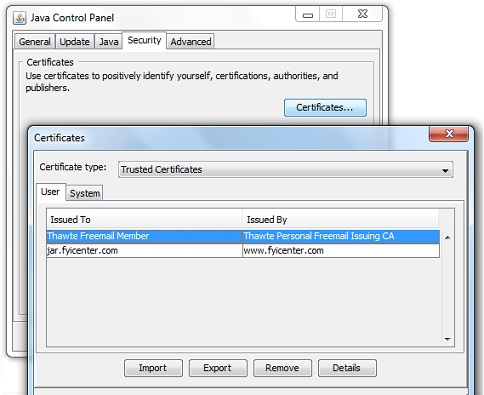
3. "Java Control Panel" divides certificates into 4 types:
- Trusted Certificates - These are certificates for signed applets and applications that are trusted.
- Secure site - These are certificates for secure sites.
- Signer CA - These are certificates of Certificate Authorities (CAs) for Trusted Certificates; Certificate Authorities are the ones who issue the certificates to the signers of Trusted Certificates.
- Secure site CA - These are certificates of Certificate Authorities (CAs) for secure sites; Certificate Authorities are the ones who issue the certificates for secure sites.
- Client Authentication - These are certificates for a client to authenticate itself to a server.
⇒ Java Control Panel - System Signer CA Certificates
⇐ How to Run Java Control Panel on Windows
2012-07-21, ≈10🔥, 0💬
Related Topics:
