Certificate Assistant - Sign CSR with CA
How to sign a CSR (Certificate Signing Request) with a CA certificate using Certificate Assistant on Mac computer?
✍: FYIcenter.com
 If you have self-sign certificate with private key attached
in your Keychain Access, you can play the root CA role and
use it sign a CSR (Certificate Signing Request)
as shown in this tutorial.
If you have self-sign certificate with private key attached
in your Keychain Access, you can play the root CA role and
use it sign a CSR (Certificate Signing Request)
as shown in this tutorial.
1. Rename your CSR file with the ".certSigningRequest", like "somesite-com.certSigningRequest".
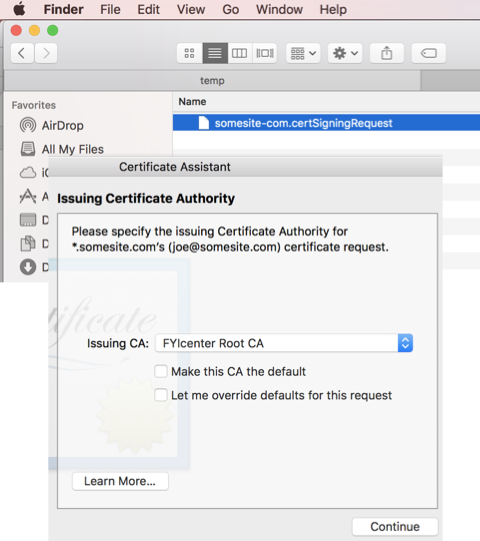
2. Double-click on the CSR file name. You the "Certificate Assistant" window.
3. Make sure that the "FYICenter Root CA" is Selectd as the "Issuing CA". And click "Continue". You see email window with a draft message with signed certificate attached and ready to be sent out.
⇒ Apple Mac Certificates Tutorials
⇐ Certificate Assistant - Create Root CA
2022-03-29, ∼1723🔥, 0💬
Related Topics:


