Certificate Assistant - Create Root CA
How to sign a root CA (Certificate Authority) using Certificate Assistant on Mac computer? I want to play the root CA role to sign and issue certificates for other people.
✍: FYIcenter.com
 If you want to play the root CA role to sign and issue certificates,
you can follow this tutorial.
If you want to play the root CA role to sign and issue certificates,
you can follow this tutorial.
1. Start Certificate Assistant inside Keychain Access as shown in the previous tutorial.
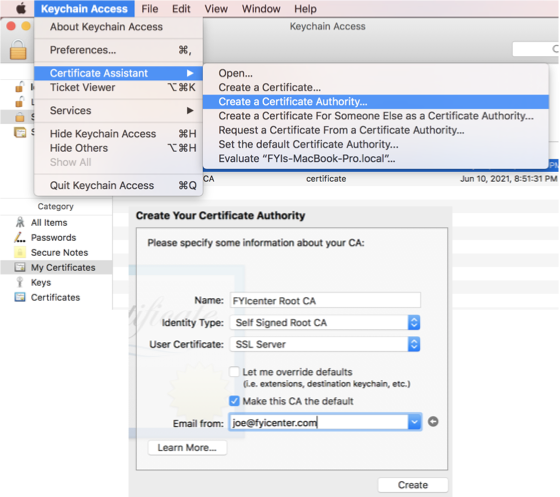
2. Click "Keychain Access > Certificate Assistant > Create a Certificate Authority" from the menu. You see the Certificate Authority input window.
3. Enter the following.
Name: FYIcenter Root CA
Identity Type: Self-Signed Root CA
User Certificate: SSL Server
[x] Make this CA default

Email from: joe@fyicenter.com
4. Click "Create". You see the conclusion window.
The root CA certificate is created and stored in the "login" keychain.
⇒ Certificate Assistant - Sign CSR with CA
⇐ Certificate Assistant - CSR (Certificate Signing Request)
2022-03-29, ∼1781🔥, 0💬
Related Topics:


