How To Download JDK for Windows
How to download JDK for Windows? I want to use the Keytool included in the JDK to generate keys and manage certificates.
✍: FYIcenter.com
 If you Windows system does not have JDK pre-installed,
you can download the latest release of JDK yourself easily.
And it's free!
If you Windows system does not have JDK pre-installed,
you can download the latest release of JDK yourself easily.
And it's free!
1. Go to JDK download Web site.
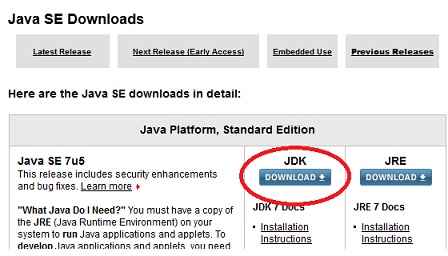
2. Click the "Download" button under JDK in the "Java SE" section.
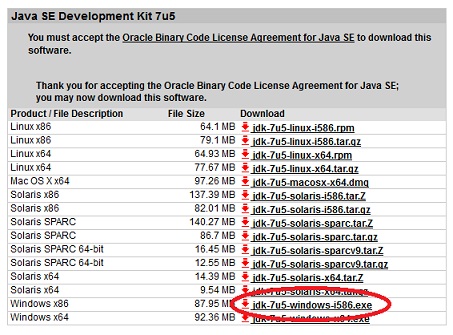
3. This brings you to the "Java SE Development Kit 7 Downloads" page. Check the "Accept License Agreement" radio button. Click "jdk-7u5-windows-i586.exe" near the end of the "Java SE Development Kit 7u5" section to start download. The release # "7u5" may change, if newer releases are available.
4. Save the file to the desktop and wait for the download to finish. It may take upto 10 minutes or longer.
⇒ How To Install JDK on Windows
⇐ Help on Using the Java Keytool Command
2012-07-19, ≈23🔥, 0💬

