Export Website Certificate from Microsoft Edge 124
How to Export Website Certificate from Microsoft Edge 124? I want to save the Website certificate as a file.
✍: FYIcenter.com
 To Export Website Certificate from Microsoft Edge 124,
you can drag the certificate icon on the certificate
dialog box to the desktop window as shown below.
To Export Website Certificate from Microsoft Edge 124,
you can drag the certificate icon on the certificate
dialog box to the desktop window as shown below.
1. Run Microsoft Edge 124 and visit https://www.yahoo.com/. You see Yahoo Website displayed with a lock icon displayed next to the Website address.
2. Click the lock icon on the left of the Website address. You see the site properties dialog box displayed.
3. Click the "Connection is secure" link. You see security properties displayed.
4. Click the certificate icon in the "Certificate is valid" line. You see the Certificate Viewer displayed.
5. Click the "Details" tab. You see the Website certificate details displayed. Scroll down to see all properties of the certificate.
6. Click the "Export" button near the bottom. You see the certificate exported to a file named after the Website domain name, like "*.fantasysports.yahoo.com.cer".
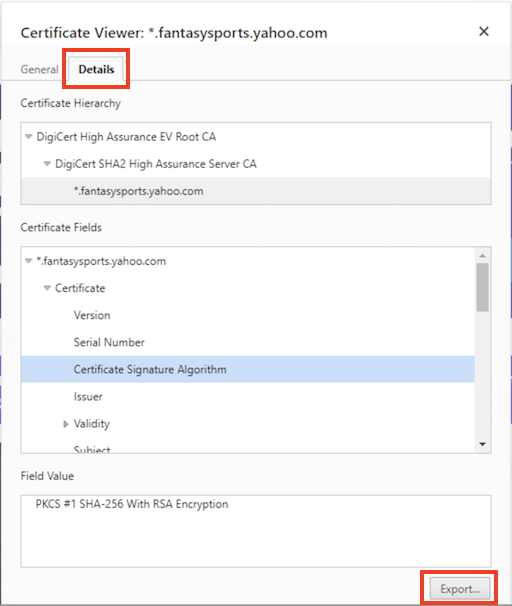
By default, Microsoft Edge 124 exports the certificate in a file format called DER (Distinguished Encoding Rules).
You can also export the root or intermediate certicate, by selecting it in the certificate chain and dragging the icon to the desktop.
⇒ Viewing Website Certificate in Microsoft Edge 93
⇐ View Certificate Chain with Microsoft Edge 124
2024-08-14, ∼1949🔥, 0💬
Related Topics:

