getacert.com Website Debugger
What is getacert.com Website Debugger? Can I use it download the certificate of a Website?
✍: FYIcenter.com
 getacert.com Website Debugger is an online tool to dump Website response with technical details
for debugging purpose. getacert.com Website Debugger also dumps the server certificate,
if the Website uses HTTPS protocol. This allows you to download the server certificate.
getacert.com Website Debugger is an online tool to dump Website response with technical details
for debugging purpose. getacert.com Website Debugger also dumps the server certificate,
if the Website uses HTTPS protocol. This allows you to download the server certificate.
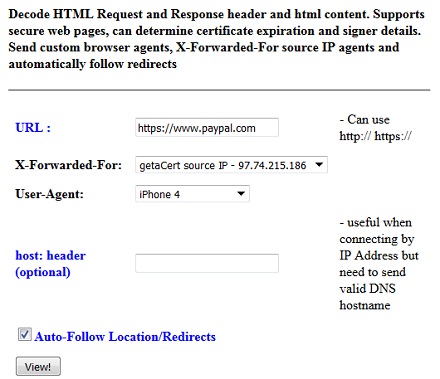
Here is the description provided by getacert.com: "Decode HTML Request and Response header and html content. Supports secure web pages, can determine certificate expiration and signer details. Send custom browser agents, X-Forwarded-For source IP agents and automatically follow redirects."
You can follow these steps to try getacert.com Website Debugger:
1. Go to http://getacert.com/cert/websniffer.py.
2. Enter the following parameters:
- URL - The URL of the Website you are visiting like https://www.paypal.com.
- X-Forwarded-For - Select getaCert server ID address.
- User-Agent - Select iPhone 4, pretending you are using an old iPhone.
- Host header - Leave it empty.
- Auto-Follow Location/Redirects - Checked.
3. Click "View!" button. You will see details of the PayPal Web server response with its server certificate. See next tutorial for explanations of the response.
The picture below shows you input fields of the Website Debugger:
⇒ getacert.com Website Debugger Output
⇐ getacert.com Website Monitor
2016-09-30, ∼3798🔥, 0💬
Related Topics:
