OpenSSL Signing Documents with RSA Keys
What is the process of signing a document with RSA keys using OpenSSL commands? I was told to deliver a document with digital signature.
✍: FYIcenter.com
 Here are steps your need to follow to sign a document with your RSA private key
using OpenSSL commands:
Here are steps your need to follow to sign a document with your RSA private key
using OpenSSL commands:
1. Get the document to be signed ready.
2. Generate a digest string from the document using "md5", "sha1", or "dgst" OpenSSL commands.
3. Select an RSA private key to be used to sign the document.
4. Sign (encrypt) the digest with the RSA private key using the "rsautl sign" command.
5. Extract the RSA public key from the RSA private key with "pkey -pubout" command
6. Send the document, the signed digest, and the RSA public key together as the "signed document".
The diagram below shows you the document signing process:
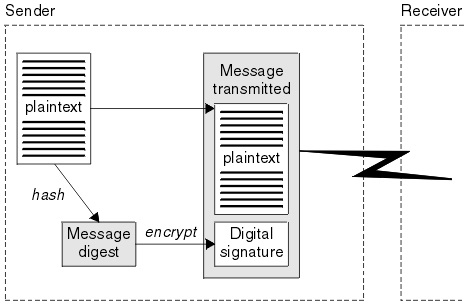
⇒ OpenSSL "rsautl -sign" - RSA Signature Generation
⇐ OpenSSL "rsautl -oaep" - OAEP Padding Option
2017-04-04, ∼4083🔥, 0💬
Related Topics:
