View Website Server Certificate in Google Chrome 29
How to view the server certificate of the Web site in Google Chrome 29? I know the Web site uses a "https" address.
✍: FYIcenter.com
 If you are visiting a Web site that uses a "https" address with Google Chrome 29,
you can view the server certificate of the site
as shown in this tutorial:
If you are visiting a Web site that uses a "https" address with Google Chrome 29,
you can view the server certificate of the site
as shown in this tutorial:
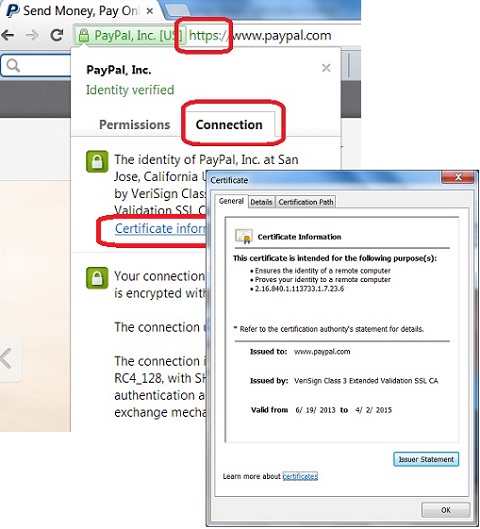
1. Run Google Chrome 29 and visit https://www.paypal.com Web site.
2. Right-mouse click anywhere on the page and click "View Page Info" menu item.
3. Click "Connection" tab. You see security information displayed for this PayPal site.
4. Click "Certificate information" link. You see general information of PayPal server certificate showing up.
⇒ "certificate is not trusted" Error in Google Chrome 29
⇐ Connection Tab of Viewing Page Info in Google Chrome 29
2016-07-15, ∼5119🔥, 0💬


