Delete Root CA Certificate from Mozilla Firefox 47
How to delete a root CA (Certificate Authority) certificate from Mozilla Firefox 47? I don't know this root CA and don't want to trust any Web sites that uses this root CA.
✍: FYIcenter.com
 If you want to delete a certificate from Mozilla Firefox 47,
you can export it to a file first, then follow this tutorial
to delete it from Mozilla Firefox 47.
If you want to delete a certificate from Mozilla Firefox 47,
you can export it to a file first, then follow this tutorial
to delete it from Mozilla Firefox 47.
1. Start "Certificate Manager" in Mozilla Firefox 47.
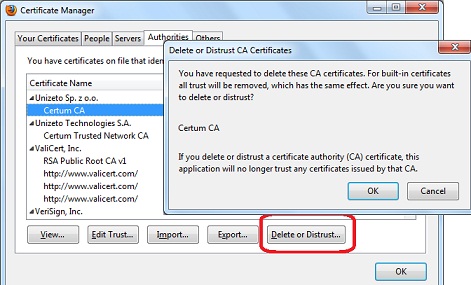
2. Click "Authorities" tab. You see the list of trusted CA certificates showing up.
3. Scroll down in the list and click "Certum CA" under "Unizeto Sp. z o.o." to highlight it.
4. Click "Delete or Distrust..." button. You see a warning message showing up.
5. Click "OK" button to finish deleting the CA certificate.
⇒ Import Root CA Certificate into Mozilla Firefox 47
⇐ Export Certificate from Mozilla Firefox 47 to File
2012-07-25, ∼8717🔥, 0💬
Related Topics:
